A complete guide to what every SyQon Studio function does, when to use it and how to approach it safely.
62
documented functions
8
workflow areas
7
real interface views
Real interface · Current Studio
See the workflow before you enter it.
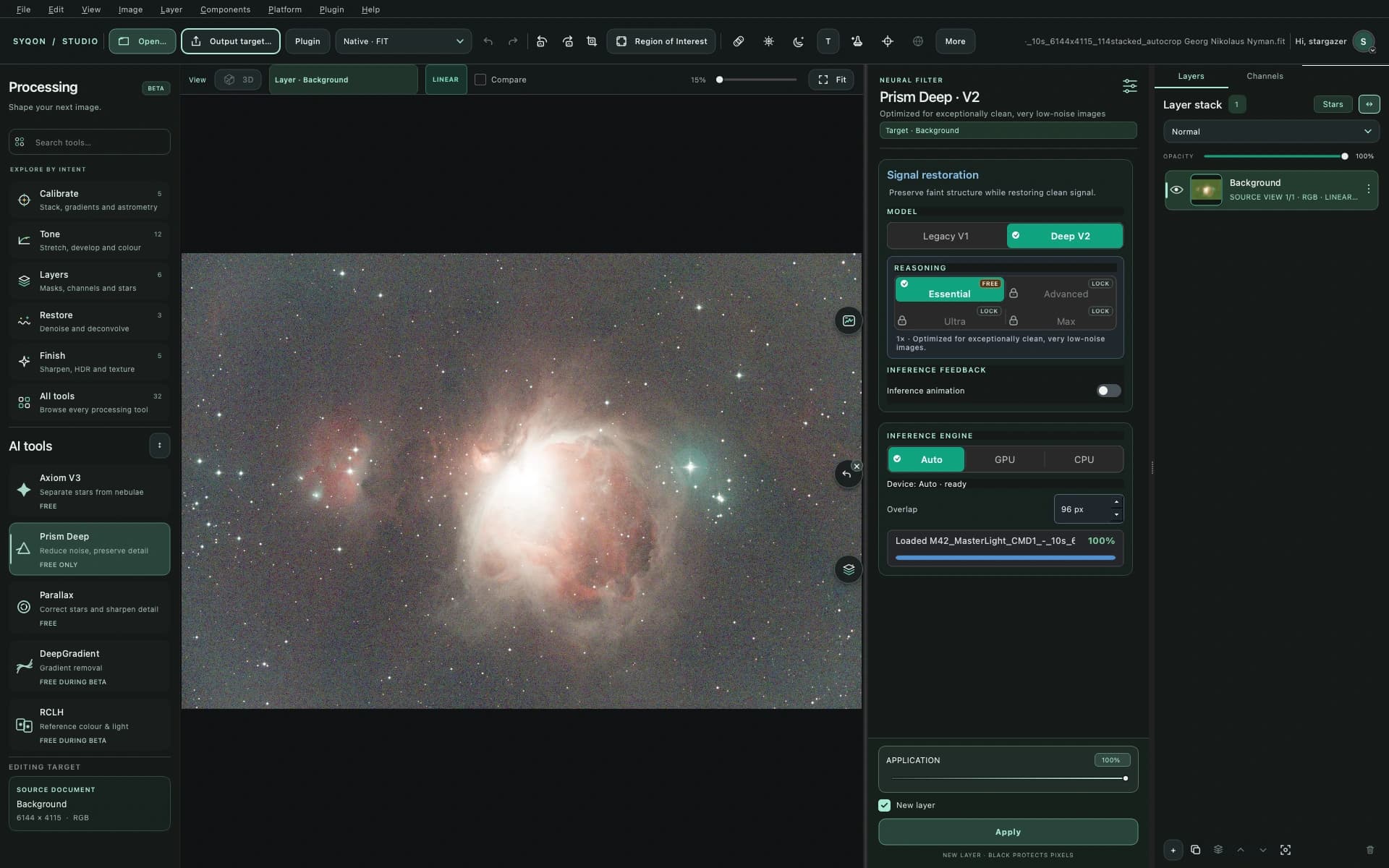
The Image Lab
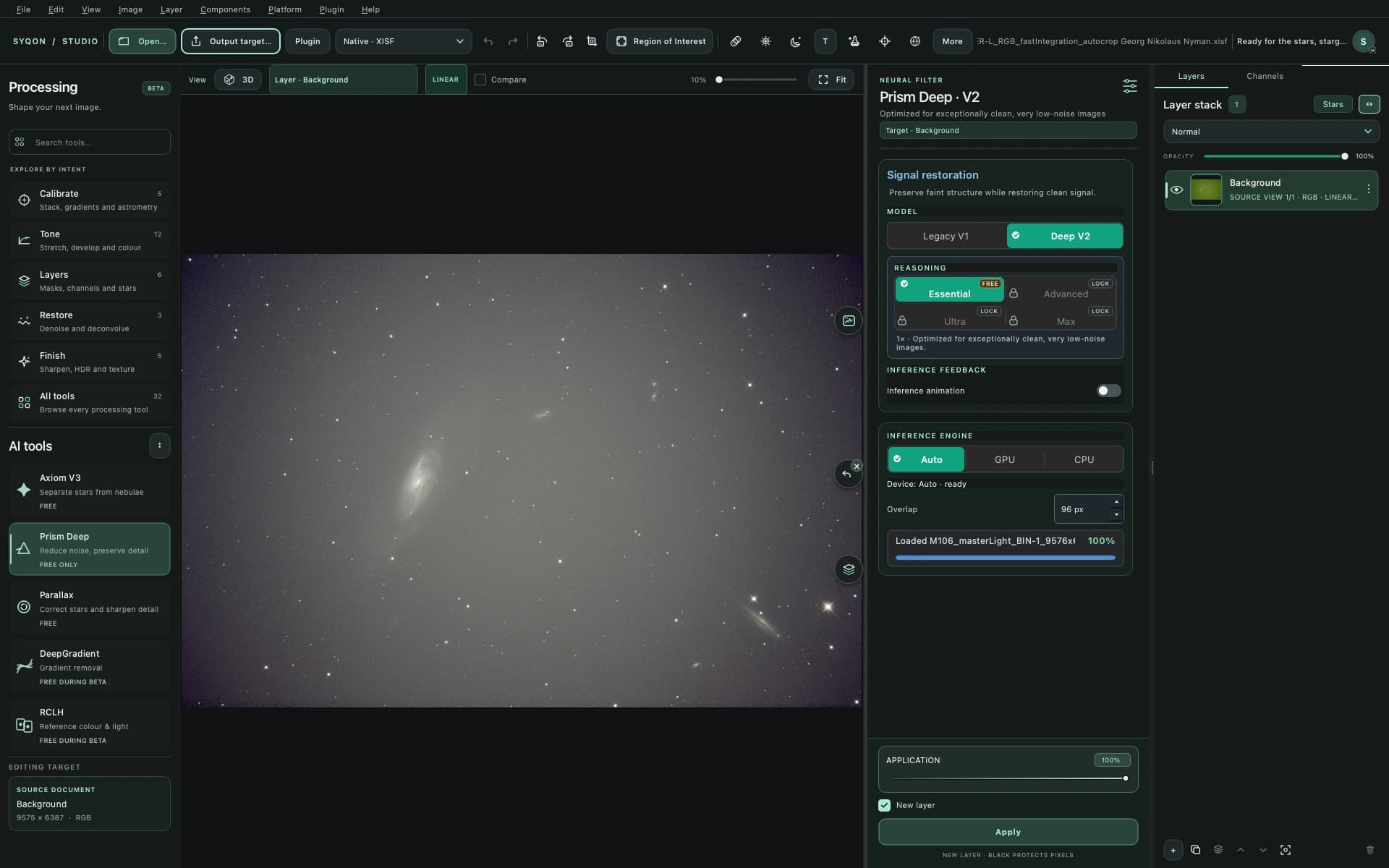
Canvas, scientific scopes, processing inspector, neural models and layer stack in one native workspace.
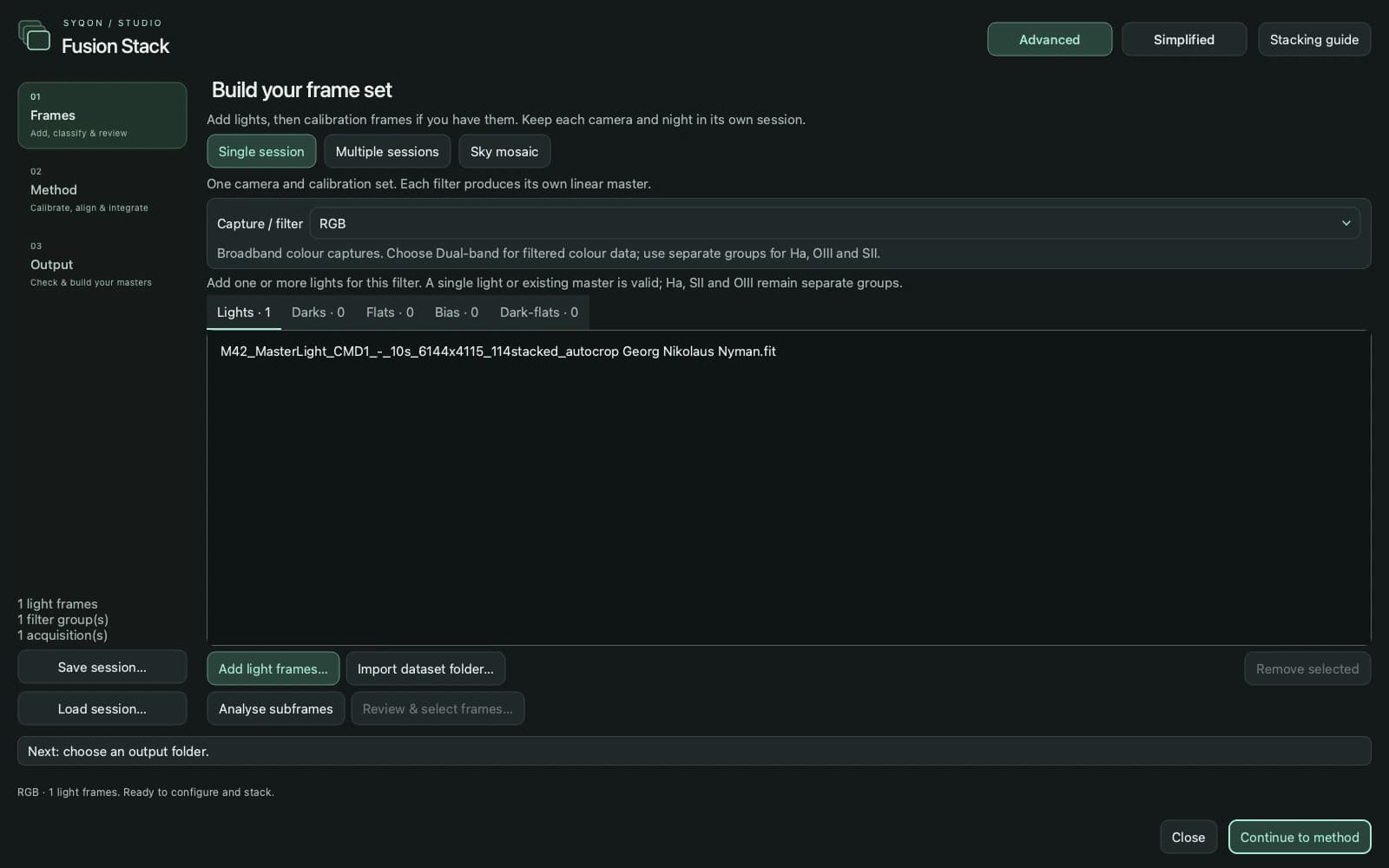
Guided stacking
Move from frames to method and output in a focused three-step workspace, with Smart Telescope and Advanced paths, calibration groups and frame review.
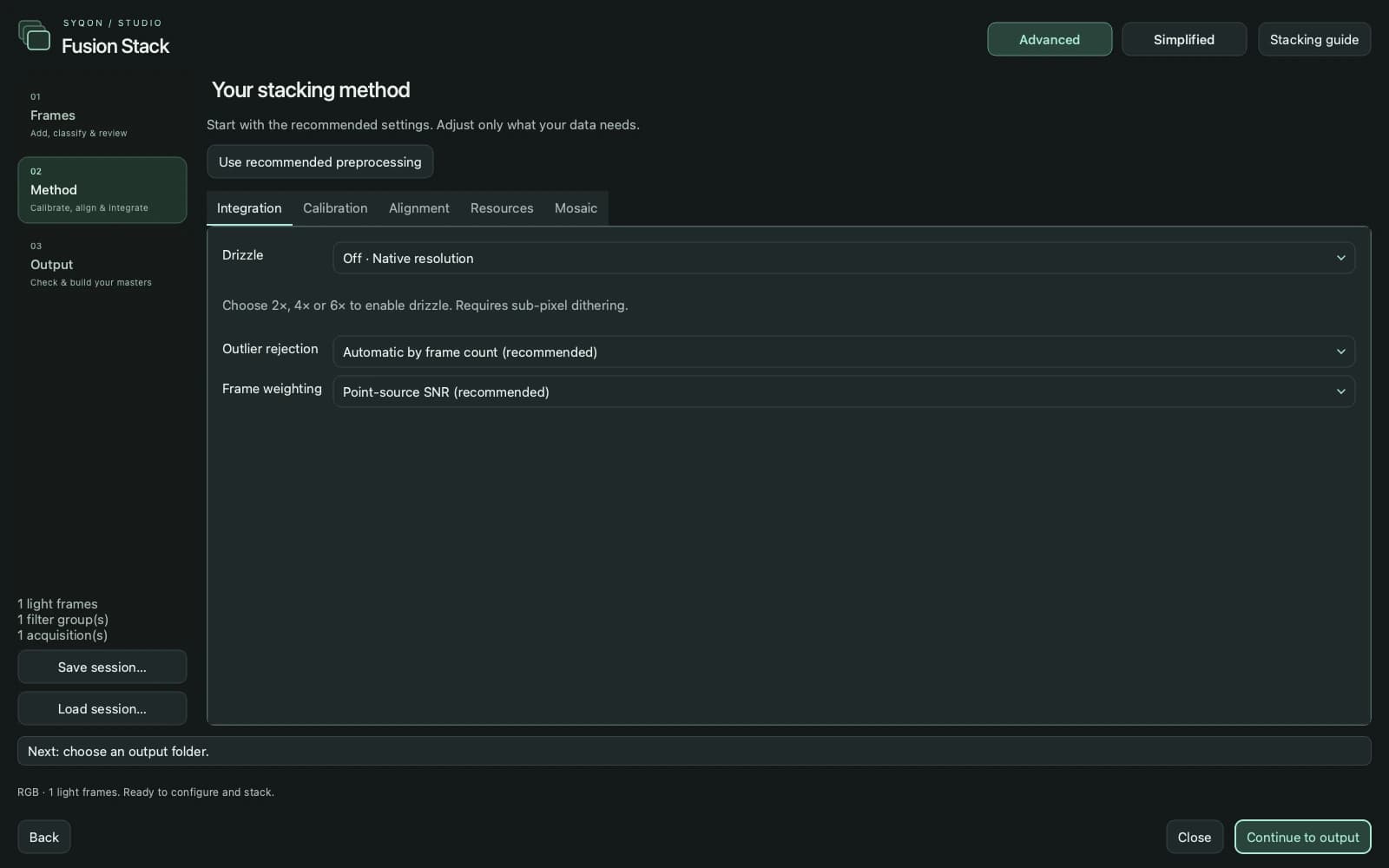
Fusion Stack
Current Stacking Studio method and integration settings
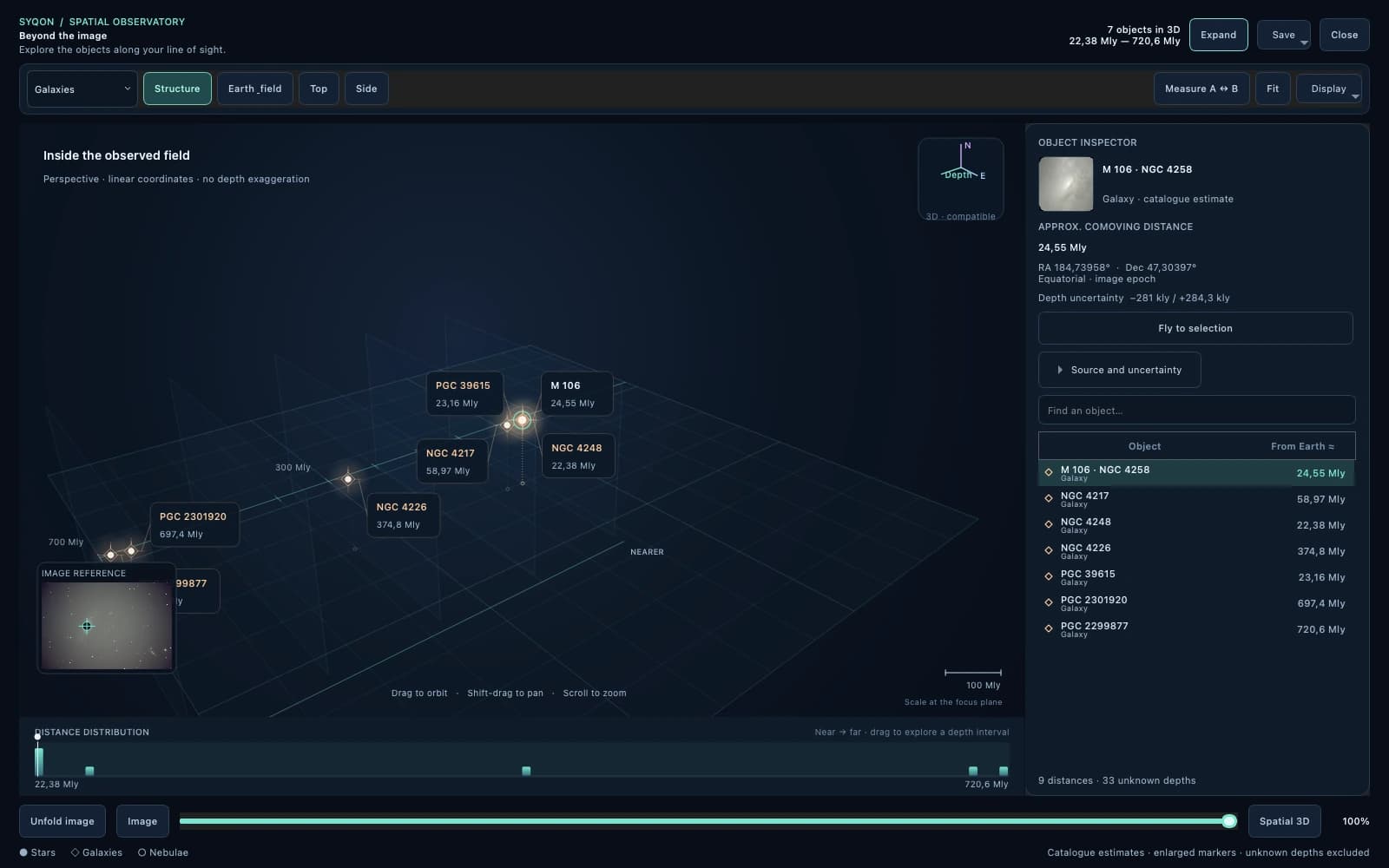
Spatial Observatory
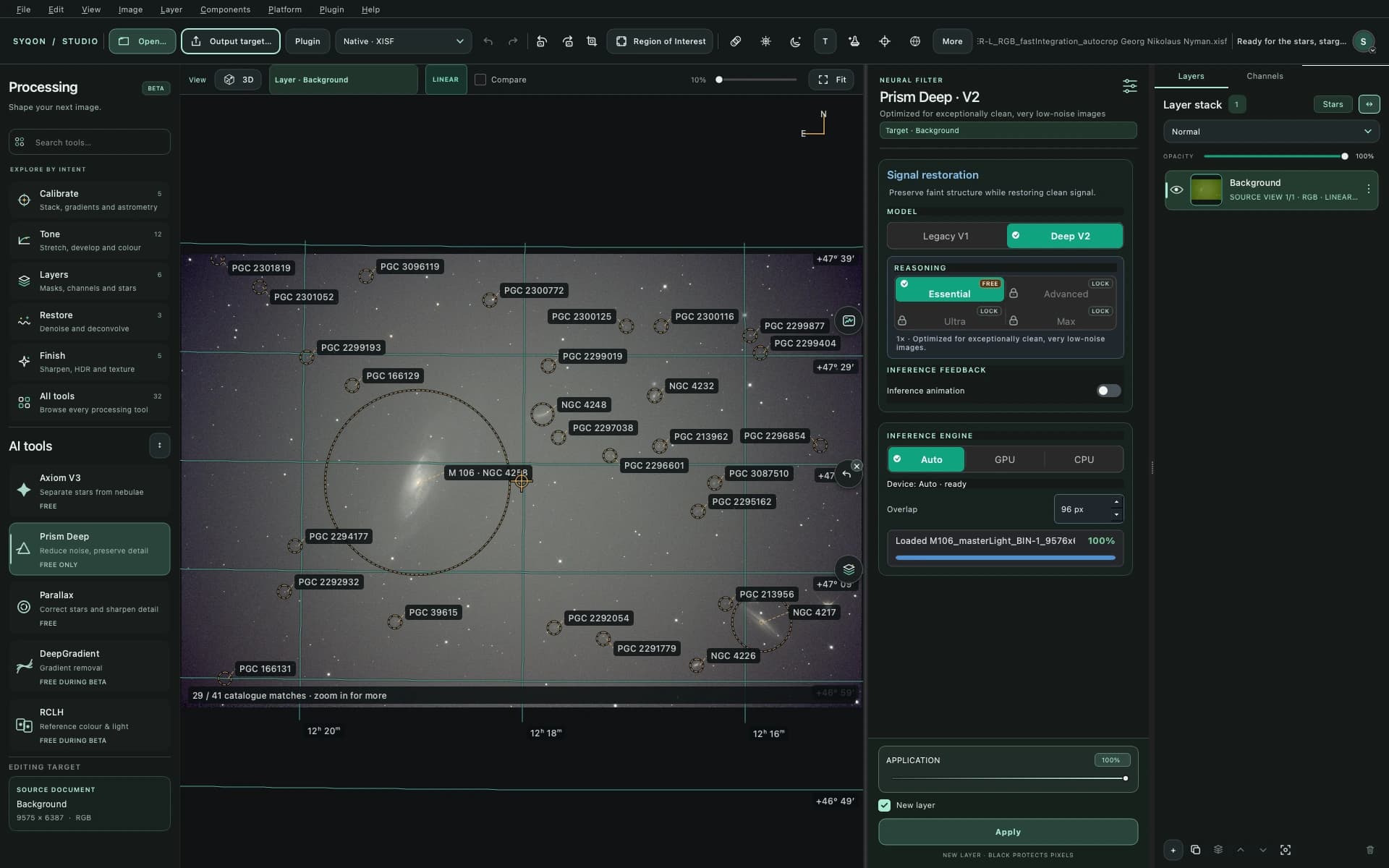
Unfold a solved field into catalogue distances, explore stars and galaxies in 3D, select an object to orbit around it and compare estimated separations.
Sky annotations
Explore catalogue names and celestial coordinates over a solved image. WCS-aware overlays follow the astronomical field rather than becoming permanent image pixels.
Pano Studio
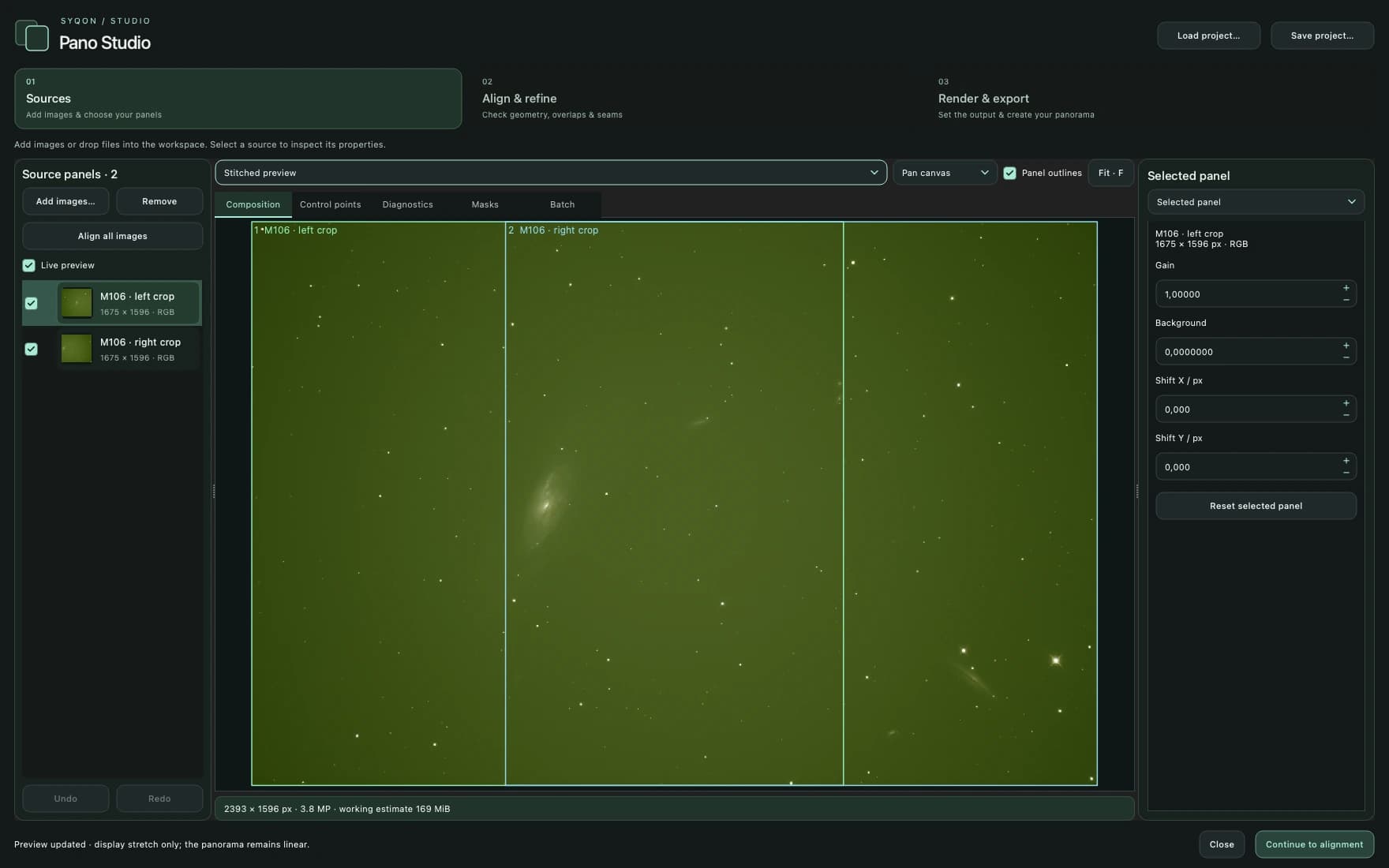
Inspect sources, refine alignment and preview a composition before rendering. This demonstration uses overlapping crops of the supplied M106 master, not separate observations.
The Image Lab
Current SyQon Studio workspace with the supplied M106 XISF master
This chapter explains the complete Fusion Stack workflow: how to organise acquisitions, assign calibration, judge subframes, choose integration settings and verify the files Studio produces. Start with the recommended path, then open the advanced sections only when the data gives you a reason.
Public-beta discipline
Keep the original frames, inspect the manifest and diagnostics, and compare important integrations against a trusted workflow. Automatic recommendations are evidence, not a replacement for judgement.
01 · Prepare the session
The reliable first integration.
1Open Processing Tools → Calibrate → SyQon Fusion Stack. You do not need to open a light frame first.
2Choose Classic, Multi-night / camera or Mosaic Studio before organising the dataset.
3Choose the current filter: RGB, L, R, G, B, Ha, OIII or SII.
4Add lights and the calibration frames that belong to the selected acquisition and filter.
5For another night, camera, telescope, gain, offset, exposure family or panel, create a new acquisition.
6Choose Use scientific preprocessing defaults as the safe starting point.
7Set the results parent folder and a new results-folder name; Studio never overwrites an existing destination.
8Run Analyse subframes, open Review & select frames, inspect the plots and confirm the Use selection.
9Leave Drizzle Off for the first integration unless the capture has genuine, well-distributed sub-pixel dithering.
10Validate the session, resolve every reported mismatch, then choose Analyse and Stack.
11After completion, inspect the master, coverage and rejection diagnostics and stacking-manifest.json.
12Enable Display Stretch to inspect the linear master; the stored scientific pixels remain linear.
One-shot colour
OSC / DSLR
Use RGB lights. Calibration happens in the sensor domain before demosaic. Keep one Bayer pattern, camera configuration and geometry per acquisition. Choose Edge-aware development or CFA drizzle when its requirements are truly met.
Separate filters
Mono LRGB / narrowband
Assign L, R, G, B, Ha, OIII and SII independently. Flats and dark-flats follow the selected filter. Fusion Stack produces separate linear masters; combine them later with Channel Composition or Spectral Master Fusion.
Several acquisitions
Multi-night / camera
Create one acquisition for every calibration/equipment family. Choose a common reference grid. Each group is calibrated and integrated independently, then same-filter masters are registered and fused.
Several sky panels
Mosaic Studio
Create one acquisition per panel and calibration set. Choose a reference, verify shared stars or valid WCS, then inspect union coverage, overlap geometry and seams. Filters stay separate on the same output grid.
Folder import
Let Studio classify a dataset
Import dataset folder scans subfolders and available FITS frame-type headers, then proposes lights, darks, flats, bias and dark-flats. Review every assignment before stacking; folder names and incomplete metadata are not proof of compatibility.
Session files
Save organisation before computing
Save session stores source paths, acquisition groups, calibration assignments, settings and frame exclusions—not the image data itself. Keep sources at stable paths, then use Load session to resume the setup.
Moving targets
Align on a comet
Enable Align on comet / moving target and provide a CSV containing path, x, y for the target centre in each light. Studio converts the stellar transforms into target-locked transforms before integration.
Acquisitions
Separate equipment, nights and calibration families.
Frame roles
Assign lights and matching calibration to the current filter.
Integration
Set backend, sampling, rejection, resources and output.
02 · Calibration frames
What belongs where.
Calibration isolation is the most important organisational rule in Fusion Stack. Darks and bias belong only to their acquisition. Flats and dark-flats belong to both the acquisition and the selected filter.
Frame role
Scope
How Studio treats it
Lights
Selected filter + acquisition
Science exposures to analyse, register and integrate. Keep dimensions, CFA layout and acquisition scaling compatible.
Darks
Acquisition
Match exposure, gain/offset and temperature where metadata exists. Darks retain their bias pedestal; Studio handles bias-separated exposure scaling when valid inputs allow it.
Flats
Selected filter + acquisition
Correct dust and illumination. Raw flats are corrected with matching dark-flats first, otherwise bias, then normalised per channel or CFA phase.
Bias
Acquisition
Optional zero-duration pedestal reference. It is never borrowed from another acquisition and must not be subtracted twice.
Dark-flats
Selected filter + acquisition
Preferred correction for matching raw flats. They do not replace light-frame darks.
Master calibration file
Its original role
One supplied file is accepted as a master. Enable “Flats are calibrated masters” only when the flat has already received bias/dark-flat correction.
Synthetic bias
Acquisition
Use only a measured constant pedestal in normalised sensor units: 16-bit FITS ADU ÷ 65535. The camera OFFSET setting is not this measurement.
Temperature
When both headers provide temperature, a dark/light difference above 2 °C is rejected. Missing metadata cannot prove compatibility.
Variable exposure
Studio can scale bias-separated dark current only when the required exposure and bias information exists. It will not silently scale an unknown pedestal.
Overscan & defects
Advanced acquisition controls can apply a measured pedestal, overscan region, cosmetic correction and an optional defect map consistently.
03 · Analyse subframes
Measure first. Exclude deliberately.
Analyse subframes measures the current acquisition/filter without creating a master. Review & select frames is where you inspect distributions, preview individual files and decide which exposures are allowed into integration.
FWHM
Relative stellar width in registration-proxy pixels. Lower generally indicates tighter stars, but undersampling and saturation can distort it.
Eccentricity
Stellar elongation indicator. Compare its distribution across the session rather than treating one number as universal.
Noise
Diagonal-difference noise estimate used by quality and weighting. It is not a substitute for visual inspection.
Background
Per-channel median sky level. Sudden changes can reveal clouds, moonlight or transparency shifts.
Relative quality
Combined within-session ranking. It is a selection aid, not a statement of absolute scientific quality.
Stars
Number of compact stellar detections supporting quality and registration diagnostics.
Weight
Contribution derived from the chosen weighting rule after accepted-frame analysis.
Status
Explains recommendation, decoding problems, incompatibility or registration failure.
Review sequence
01Sort by quality, then inspect the worst and best tails.
02Change the metric plot and look for discontinuities or separate populations.
03Preview suspicious frames for clouds, trails, focus loss, clipping or tracking errors.
04Use the checkbox to override a recommendation only when visual evidence supports it.
05Choose Apply to retain exclusions; export CSV when you need an external record.
Large nebulosity, saturation and severe undersampling can influence the metrics. They are heuristics, not automatic cloud classification.
04 · Integration settings
Change a default only for a reason.
Scientific preprocessing defaults establish a robust baseline: calibrated masters, edge-aware demosaic, cosmetic correction, dark optimisation, local background normalisation, resumable checkpoints, point-source SNR weighting and automatic rejection.
Registration
Use the normal affine path for a consistent raw sequence. Blind projective registration is for large scale, rotation or perspective differences and should not be enabled merely because one poor frame fails. Non-converging frames are rejected instead of silently relabelled.
Normalisation
Local background normalisation corrects spatial background differences after registration. Within a raw acquisition the default is additive background matching, not arbitrary throughput or exposure scaling. Inspect faint extended signal carefully.
Weighting & PSF
Choose inverse variance, measured stellar signal or point-source SNR. Weights change contribution, not sample brightness. Optional PSF matching can equalise Gaussian variance to the broadest accepted frame before projection.
Rejection chooser
Automatic is the right first choice. Manual methods are for datasets whose failure mode you have identified in previews, maps or statistics.
Method
Consider it for
Behaviour
Automatic by frame count
Recommended default
Chooses a bounded method appropriate to the number of accepted frames.
Weighted mean
Very small or exceptionally clean sets
No outlier rejection; every valid sample contributes according to weight.
Percentile clipping
Small stacks
Removes bounded low/high ranks where robust variance estimates would be weak.
Studentized sigma rejection
Satellites, hot residuals, isolated transients
Tests each sample against statistics that exclude its own influence.
Studentized sigma clamp
Transient control without complete removal
Clamps detected extremes rather than discarding their contribution entirely.
Linear-fit clipping
Frames with differing linear response
Uses a fitted relationship before testing sample residuals.
Generalized ESD
Large stacks
Detects one or more extremes with thresholds suited to a larger temporal population.
Min / max
Predictable fixed-rank removal
Removes a configured number of lowest and highest samples.
Large-scale rejection
Broad moving contamination
Targets spatially coherent rejected regions; use only when the data justifies it.
Sigma controls: lower and upper sigma limits define how aggressively dark and bright extremes are treated. Tightening them can remove real variable or compact signal. Inspect the rejection map rather than choosing values by habit.
05 · Drizzle & resources
More pixels are not automatically more detail.
Drizzle reconstructs sampling from real sub-pixel offsets. It does not invent resolution, denoise the stack or compensate for repeated identical dithers. Always integrate at native resolution first.
Off
1× dimensions · 1× pixels
Best first integration and default when dithering is absent or uncertain.
2×
2× dimensions · 4× pixels
Useful for genuinely undersampled, dithered data with manageable output size.
4×
4× dimensions · 16× pixels
Heavy storage and compute cost. Requires dense, varied sub-pixel phases.
6×
6× dimensions · 36× pixels
Specialist sampling mode, not six times more real detail. Coverage inspection is essential.
Pixel fraction and Point
A positive pixfrac spreads each square drop; smaller values reduce extra smoothing but demand denser coverage and can make noise less uniform. 0 · Point assigns each sensor sample once without spatial spreading. It requires dense dither phases and does not undo correlation already introduced by demosaic.
CFA drizzle
For Bayer lights at 2×, 4× or 6×, CFA drizzle integrates original red, green and blue sensor samples directly instead of interpolating before integration. Confirm the Bayer pattern and inspect colour-channel coverage; it is not appropriate for already demosaiced input.
Memory and disk
The memory budget is a ceiling, not a reservation. Fusion Stack caches calibrated float32 data and processes bounded output tiles, but one decoded frame and calibration buffers must still fit. Drizzle, maps, intermediate acquisition masters and checkpoints can require far more disk than the source dataset.
Backend and checkpoints
Automatic prefers the supported GPU path and reports the backend actually used. Decoding, robust statistics and some mosaic geometry remain CPU work. Checkpoints can reuse verified caches and completed tiles when inputs and compatible settings remain unchanged; retain enough disk space until verification is complete.
06 · Results & diagnostics
A master is not the only result.
A successful run publishes a named folder atomically. The image, maps and manifest together explain what was accepted, how it was transformed and where the output is trustworthy.
Master_*.fits
Float64 linear master for each populated filter or final fused band.
Coverage_*.fits
Effective support or acquisition weight. Use it to find holes, weak borders and uneven drizzle sampling.
Rejection_*.fits
Where temporal samples were rejected. Look for expected trails/hot pixels and unexpected target-shaped rejection.
Read every warning and verify accepted/rejected counts.
Enable Display Stretch; inspect centre, corners and mosaic overlaps at 100%.
Check star shapes, colour balance, gradients, clipping and satellite residuals.
Inspect coverage at edges and every drizzle or mosaic transition.
Inspect the rejection map for target-shaped structures.
Keep the manifest with the master so the integration remains reproducible.
Mosaics: plan before integration
Use common sampling, sufficient overlap and a defensible reference. The acquisition mosaic and post-production mosaic workflows are related, but they start from different inputs.
Troubleshooting
When the data disagrees.
?A calibration mismatch is reported
Do not bypass it blindly. Check camera, dimensions, binning, Bayer pattern, exposure, gain, offset and temperature. Move incompatible files into a separate acquisition.
?The master opens almost black
That is expected for linear data. Enable Display Stretch for inspection; do not alter the master merely to make a viewer display it brightly.
?Stars fail to register
Choose a representative reference, verify overlap and comparable scale, remove frames with trails/clouds, and use blind projective registration only for genuinely large geometric differences.
?Drizzle shows holes or uneven noise
The dither phases are insufficient or pixfrac is too small. Inspect Coverage, increase positive pixfrac, reduce the drizzle scale or return to native resolution.
?A mosaic has seams
Verify calibration per panel, overlap support, WCS/stellar geometry, local background normalisation and feathering. Controls cannot recover missing exposure.
?The job needs too much memory or disk
Lower the working-memory ceiling only if one decoded frame still fits, use a fast local SSD, disable unnecessary drizzle/maps and remove retained checkpoints only after the result is verified.
?A frame is checked but still excluded
Manual Use overrides quality/FWHM/eccentricity limits, not unreadable data, incompatible geometry or failed registration.
?The run is interrupted
No partial final master is published. Load the saved session and reuse compatible checkpoints when inputs and settings are unchanged.
Searchable reference
Every function, explained.
Search by outcome—try “remove green”, “walking noise”, “mosaic”, “stars” or “export JPEG”—or filter by workflow area.
62 functions
Inspect & Output
Spatial Observatory
Unfold a solved field into catalogue distances, explore stars and galaxies in 3D, select an object to orbit around it and compare estimated separations.
Use it when
Exploring a solved field in three dimensions.
How to use it
1Solve the active image, then open 3D from the toolbar or View menu.
2Select an object to rotate and zoom around it; use Fly to selection to approach it.
3Choose the stellar or galaxy scale, measure A ↔ B and inspect source and uncertainty.
Distances are catalogue estimates, not measurements extracted from image brightness.
Inspect & Output
Share the spatial view
Export the scene as PNG, PDF or MP4 with the Earth as the observation origin. Choose Landscape, Vertical or Square video framing; every export carries the Studio signature.
Use it when
Sharing an isolated 3D scene.
How to use it
1In the 3D window, choose Save, then PNG image, MP4 animation or PDF.
2For video, choose Landscape, Vertical or Square and a destination file.
3Exports contain the scene rather than the application interface, with the SyQon Studio logo and signature; the video includes Earth.
Inspect & Output
Sky annotations
Explore catalogue names and celestial coordinates over a solved image. WCS-aware overlays follow the astronomical field rather than becoming permanent image pixels.
Use it when
Identifying objects in a solved image.
How to use it
1Solve the active layer with Image Solver before enabling sky annotations.
2Enable the sky overlay and inspect catalogue names and celestial coordinates over the image.
3Check the WCS alignment; a catalogue label alone does not confirm an image detection.
Stacking & Astrometry
Pano Studio
Bring overlapping panels into a dedicated workspace for alignment, control points, masks, composition preview and final rendering.
Use it when
Composing overlapping, already-processed panels.
How to use it
1Open Image → Pano Studio and add the source panels.
2Inspect alignment, refine control points and masks, then preview the composition.
3Render the panorama and inspect seams and coverage before continuing processing.
Inspect & Output
Interactive CLI model editor
Launch the focused model editor with -gui: ROI, model intensity, switchable Autostretch and Done return an image to the calling script in its original container format.
Use it when
Letting an external script pause for manual model processing.
How to use it
1Run syqon-cli -gui input.tiff output.tiff and wait for the process to exit.
2Select a model, position the ROI, adjust application intensity and toggle display-only Autostretch as needed.
3Click Done to save in the input container format: exit 0 returns the saved path; closing without Done returns 20.
Studio authentication and model entitlements still apply. First use may require sign-in and model asset setup; -gui does not bypass licensing.
Start
Welcome workspace
Start a stack, open an image or project, compose channels, or launch the guided tutorial.
Use it when
You are beginning a new session.
How to use it
1Choose New stack for raw subframes, Open file for an existing image or project, or New channel composition for masters.
2Use Explore Processing Tools to browse the complete component catalogue.
3Keep multiple images open as tabs or detach them when comparing documents.
Start
Open images and projects
Open FITS, XISF, TIFF, PNG, JPEG, camera RAW, SYQPRJ and self-contained SYQ documents.
Use it when
You already have a master, photograph or saved Studio project.
How to use it
1Click Open… in the top toolbar or use File → Open.
2Review the file preview and scientific metadata.
3For SYQPRJ, keep the matching .syqprj.assets folder beside the project file.
Start
Camera RAW development
Decode DSLR and mirrorless RAW data with controlled demosaic, white balance, highlight recovery and camera colour handling.
Use it when
Opening CR2, CR3, NEF, ARW, DNG or another supported camera RAW file.
How to use it
1Open the RAW file and review the development panel before creating the document.
2Choose the demosaic and white-balance source appropriate to the acquisition.
3Set highlight recovery, exposure and colour handling conservatively.
4Create the RGB document, then continue with the standard layer workflow.
Start
Canvas navigation
Zoom, fit, pan and move through large astronomical images without changing pixel data.
Use it when
Inspecting structure at different scales.
How to use it
1Use the zoom slider or Fit in the canvas toolbar.
2Hold Space and drag to pan while another canvas tool is active.
3Read cursor position and document resolution from the canvas status area.
Start
Undo, redo and SYQ history
Recover processing decisions and preserve the intent of a layered workflow.
Use it when
Exploring alternatives or correcting a recent edit.
How to use it
1Use Undo and Redo in the toolbar or Edit menu.
2Keep important alternatives on separate layers before committing.
3Save an editable project when you need the layer graph and parameters later.
History depth is bounded; projects preserve the current editable state rather than every transient preview.
Start
Crop, rotate and geometry
Reframe, resize or rotate the complete document while keeping layers, masks and WCS relationships coherent.
Use it when
Correcting framing or preparing a final composition.
How to use it
1Activate Crop from the top toolbar.
2Move the centre to reposition, drag handles to resize, and use ratio or rotation controls when required.
3Apply the crop only after verifying all document layers.
Start
Local retouching tools
Heal defects, clone signal, dodge, burn and add text on editable non-linear layers.
Use it when
Removing presentation defects or applying final local corrections.
How to use it
1Select a suitable pixel layer.
2Choose Healing, Clone Stamp, Dodge, Burn or Text from the top toolbar.
3Adjust brush size and feather; use Option/Alt-click to set a Clone Stamp source.
4Exit the tool with Escape and use Undo if needed.
Use these tools for presentation work, not as substitutes for calibration or scientific correction.
NeuralMini free · V3 licensed
Axiom V3 and Axiom Mini
Separate stellar signal from the deep-sky background and create an independent Stars Only layer.
Use it when
You want to process stars and background separately.
How to use it
1Select the source pixel layer and open Axiom from Neural Filters.
2Choose the available model and review the preview region.
3Apply to create the starless result and reusable Stars Only layer.
4Use Star Stretch, Star Editing and Reapply Stars for recomposition.
NeuralEssential free · Pro profiles licensed
DeepPrism V2
Locally denoise and restore astronomical structure using profile-specific neural inference.
Use it when
Noise or acquisition softness obscures real signal.
How to use it
1Open Prism Deep and choose Essential, Advanced, Ultra or Max according to the image and workstation.
2Use the preview region to inspect reconstruction at native scale.
3Apply to a new layer and compare at 100% zoom.
4Reduce strength or mask the result if faint texture becomes too uniform.
NeuralNano free · Pro licensed
Parallax and Parallax Nano
Reduce stars, correct stellar shapes or deblur compact structure with local neural inference.
Use it when
Stars are too dominant, optically distorted or mildly soft.
How to use it
1Open Parallax and select Reduction, Correction or Deblur.
2Choose Nano or the licensed model available to the account.
3Inspect representative stars in the movable preview region.
4Apply conservatively to a new layer and compare star cores at 100%.
NeuralFree during beta
Deep Gradient
Remove complex large-scale illumination from linear images through a fixed-shape neural background model.
Use it when
A linear wide field contains gradients that are difficult to sample manually.
How to use it
1Select a linear pixel layer and open Deep Gradient.
2Inspect the predicted background and valid image area.
3Apply the corrected result to a new layer.
4Compare against classical Gradient Removal when preservation near large targets is critical.
NeuralFree during beta
RCLH
Transfer reference chromaticity, luminance or both while preserving the geometry of the source image.
Use it when
Matching the appearance of another rendering of the same field.
How to use it
1Open RCLH and load a corresponding JPEG, PNG, WebP or TIFF reference.
2Choose Colours only, Luminance only, or Colours and luminance.
3Check overlap and feathering, then apply to a new layer.
RCLH transfers appearance; it is not photometric calibration and does not copy reference structures.
Tone & Colour
Display Stretch
Reveal faint linear signal with a visual-only statistical transform, then optionally make it permanent.
Use it when
Viewing linear data before committing to a non-linear image.
How to use it
1Open Display Stretch from Quick Start.
2Enable Statistical AutoStretch and link RGB channels when appropriate.
3Adjust the target median while watching the histogram.
4Enable New layer and Apply only when ready to bake the transform.
Tone & Colour
SyQon Continuum Stretch
Shape black, midtone and white points with SyQon’s iterative tonal engine.
Use it when
Moving a linear master into a controlled non-linear state.
How to use it
1Open Continuum Stretch and set the tonal targets.
2Watch shadow separation and highlight protection in the preview.
3Apply once the background and target remain balanced.
Tone & Colour
Develop
Establish a natural tonal and colour starting point through grouped development controls.
Use it when
Beginning broad non-linear image development.
How to use it
1Open Develop on the active layer.
2Balance exposure, contrast and colour in small moves.
3Use a new layer so the development remains adjustable by opacity.
Tone & Colour
Curves
Shape luminance and colour response with precise control points.
Use it when
Adding local contrast or targeted channel changes.
How to use it
1Choose the luminance or RGB channel.
2Add and move curve points while monitoring clipping.
3Use a mask when the curve should affect only part of the image.
Tone & Colour
Color Calibration
Neutralise the image background and balance white from image statistics.
Use it when
A linear RGB image has a global colour cast and plate solving is unavailable or unnecessary.
How to use it
1Open Color Calibration on a linear RGB layer.
2Set background neutralisation and white-balance strengths.
3Apply and verify the channels with linked display stretch.
For catalogue-based spectral calibration, use SPCC instead.
Tone & Colour
Levels
Set black, midtone and white points numerically.
Use it when
You need predictable global range control.
How to use it
1Open Levels and inspect the histogram.
2Move the black point without clipping meaningful background.
3Set midtone and white point, then apply on a new layer when possible.
Tone & Colour
Background Tone
Balance sky luminance and colour without globally reworking the target.
Use it when
The background feels too bright, dark, warm or cool after stretch.
How to use it
1Open Background Tone.
2Adjust luminance, temperature and tint while sampling empty sky.
3Use a target-protection mask for crowded or nebulous fields.
Tone & Colour
Protected Color Boost
Increase midtone colour while protecting shadows and saturated extremes.
Use it when
Colour needs presence without clipping stars or noisy background.
How to use it
1Open Protected Color Boost.
2Raise colour amount gradually.
3Tune shadow and highlight protection, then compare at Fit and 100% zoom.
Tone & Colour
Advanced Color
Grade six hue sectors, balance RGB by tonal range and control vibrance with luminance and gamut protection.
Use it when
Performing selective creative colour finishing.
How to use it
1Choose Global, Selective or Balance controls.
2Target hue sectors or shadows, midtones and highlights.
3Enable luminance preservation and gamut compression when required.
4Apply through a mask for regional grading.
Tone & Colour
ColorPro
Use three-way colour wheels, image picking, selective grading and optional OpenColorIO workflow.
Use it when
A colourist-style interface is preferable for final grading.
How to use it
1Open ColorPro and select the tonal wheel or sampled colour range.
2Use the image picker to target a region.
3Adjust the grade, proof the working space and apply non-destructively.
Tone & Colour
Star Stretch
Stretch an Axiom Stars Only layer using the SETI Astro transfer with optional colour boost and SCNR.
Use it when
Reintroducing linear stars into a processed background.
How to use it
1Create or select the latest Axiom Stars Only layer.
2Open Star Stretch and choose the transfer strength.
3Adjust optional colour boost and SCNR.
4Apply before Star Editing or Reapply Stars.
Stacking & Astrometry
Fusion Stack
Calibrate, analyse, register and robustly integrate classic, multi-session or mosaic acquisitions.
Use it when
Starting from raw light and calibration frames.
How to use it
1Choose New stack or open SyQon Fusion Stack from Calibrate.
2Select Classic, Dual-scope / Multi-session or Mosaic Studio.
3Add lights, darks, flats, bias and dark-flats to the correct acquisition and filter.
4In Frames, organise acquisitions and calibration; in Method, choose the processing settings; in Output, set the destination and run the stack.
Use scientific preprocessing defaults unless you have a measured reason to change rejection, normalisation or drizzle.
Stacking & Astrometry
Subframe analysis and review
Measure FWHM, eccentricity, background, noise, stars and relative frame quality before integration.
Use it when
Rejecting weak frames or diagnosing acquisition quality.
How to use it
1Add light frames in Fusion Stack.
2Click Analyse subframes.
3Open Review subframes to inspect previews and recommendations.
4Override Use selections when visual evidence justifies it.
Stacking & Astrometry
Mosaic Studio
Register multiple panels into a common spherical canvas with overlap, coverage and seam diagnostics.
Use it when
Combining adjacent fields or sessions with different geometry.
How to use it
1Choose Mosaic Studio in Fusion Stack and keep each panel as its own acquisition.
2Configure calibration and filters per panel.
3Use WCS when available or the validated optical registration path.
4Review layout, coverage and seam diagnostics before publishing the mosaic.
Stacking & Astrometry
Astrometric Mosaic Planner
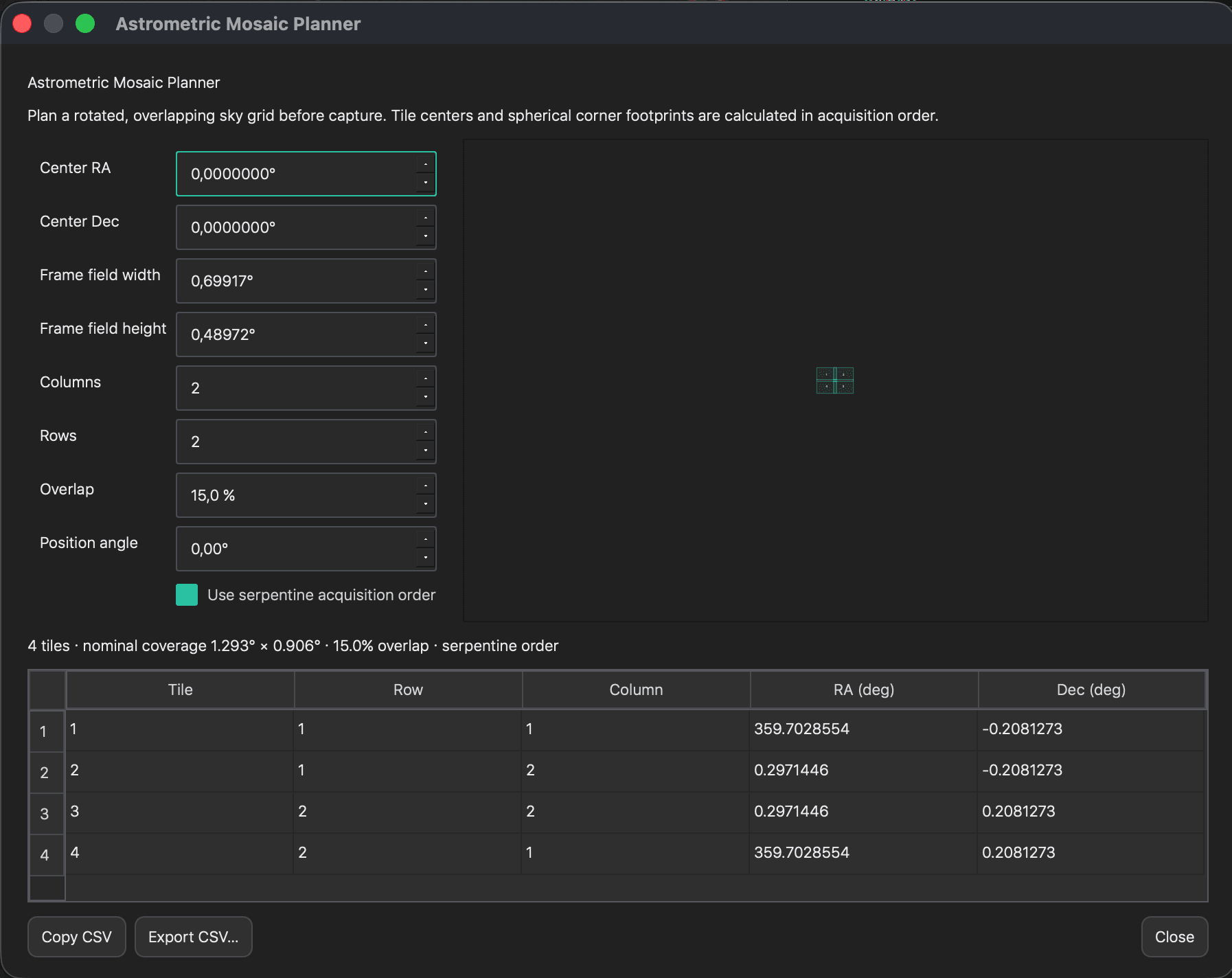
Plan a rotated, overlapping sky grid before acquisition and export tile coordinates.
Use it when
Designing a future mosaic sequence.
How to use it
1Open the planner from the astrometry tools.
2Enter centre RA/Dec, field width and height, rows, columns, overlap and position angle.
3Choose serpentine order if useful.
4Copy or export the generated CSV coordinates.
Stacking & Astrometry
Image Solver
Solve an image locally with ASTAP and write a complete celestial WCS solution.
Use it when
You need sky coordinates, SPCC, overlays or WCS-aware mosaics.
How to use it
1Open Image Solver from Calibrate.
2Provide approximate centre, field scale or focal information when known.
3Run the local solve and confirm coordinates and scale.
4The WCS is attached to the resulting layer/document.
Stacking & Astrometry
Spectrophotometric Color Calibration
Calibrate linear RGB colour against local Gaia DR3 XP spectrophotometry.
Use it when
A solved linear colour image needs catalogue-based colour calibration.
How to use it
1Solve the image first with Image Solver.
2Open Spectrophotometric Color Calibration.
3Choose the white reference and review matched catalogue stars.
4Apply, then inspect the result with linked RGB display stretch.
Stacking & Astrometry
Alignment Studio
Register open documents using stars or manual control points and inspect distortion residuals.
Use it when
Combining masters or matching layers from different sources.
How to use it
1Open all source and reference documents.
2Launch Alignment Studio and select the reference.
3Choose automatic stars or place manual control points.
4Review residuals, then create the aligned result.
Layers & Channels
Layers, groups and blending
Build a non-destructive document from pixel, component, channel and mask layers.
Use it when
Combining processing stages without overwriting the source.
How to use it
1Enable New layer before applying a component.
2Use the Layers panel to reorder, group, duplicate, hide or delete layers.
3Set opacity and blend mode for the selected layer.
4Use Only Stars, Hide Stars and Reapply Stars where applicable.
Layers & Channels
Mask Creator
Create tonal, stellar, filament and ultra-faint diffuse-nebula protection masks.
Use it when
A process must affect only selected signal ranges or structures.
How to use it
1Open Mask Creator from Layers.
2Choose the mask family and tune its detection or tonal range.
3Create the mask as a document layer.
4Attach it through Mask Stack; white reveals the process and black protects pixels.
Layers & Channels
Drawn and gradient masks
Paint, erase or place linear/radial gradients directly over the image.
Use it when
You need spatial control that automatic masks cannot describe.
How to use it
1Create or select a mask layer.
2Choose brush, linear gradient or radial gradient.
3Drag the centre to reposition and the outer handle to change size or falloff.
4Leave the mask editor or change layers to clear its on-canvas controls.
Layers & Channels
Mask Stack
Combine multiple masks through Multiply, Minimum, Maximum, Add and related operations.
Use it when
Protection depends on both structure and location.
How to use it
1Select the target processing layer.
2Open Mask Stack in the Layers panel.
3Add existing mask layers and choose a combining operation.
4Preview the effective mask before processing.
Layers & Channels
Channel Composition
Import and combine RGB, luminance or narrowband masters into a colour document.
Use it when
Starting from separate mono filter masters.
How to use it
1Choose New channel composition or open the component.
2Assign each file to R, G, B, L or an emission-line channel.
3Align sources when required.
4Create the composition and continue with calibration or stretch.
3Refine colour, core and halo controls at 100% zoom.
4Reapply Stars when the stellar layer is ready.
Layers & Channels
Channel Mixer
Create new colour relationships with an RGB 3×3 matrix and composition presets.
Use it when
Remapping channels or producing controlled colour combinations.
How to use it
1Open Channel Mixer on an RGB layer.
2Choose a preset or edit the output-channel coefficients.
3Preserve luminance or normalise coefficients when required.
4Apply to a new layer and check neutral regions.
Layers & Channels
Narrowband Palette Simulator
Preview and apply SHO, HSO, HOO and alternative emission-line mappings.
Use it when
Working with separate SII, Ha and OIII signal.
How to use it
1Prepare assigned narrowband channels.
2Open the palette simulator and select a mapping.
3Balance channel contributions and preview the palette.
4Apply the chosen mapping to a new colour layer.
Layers & Channels
Pixel Math
Evaluate custom expressions for output channels and combine the active image with another document.
Use it when
A channel operation requires exact mathematical control.
How to use it
1Open Pixel Math and select the output domain.
2Write expressions for R, G, B or the mono result using the available image variables.
3Preview on a small region first.
4Apply to a new layer and verify signed/HDR values when working linearly.
Layers & Channels
Color Management & Proof
Assign or convert RGB working spaces, adapt white points, inspect gamut and soft-proof output.
Use it when
Preparing predictable display or print colour.
How to use it
1Open Color Management & Proof.
2Choose whether to assign or convert the profile.
3Select rendering intent and white-point adaptation.
4Enable gamut warning or soft proof before committing.
Restoration
Multiscale & Restoration
Access local contrast, MLT/MMT, convolution, FFT, LHE/CLAHE, range, morphology, denoise and PSF deconvolution.
Use it when
You need classical, measurable structure control rather than a neural model.
How to use it
1Open Multiscale & Restoration from Restore.
2Choose the method family and inspect its dedicated controls.
3Estimate or configure the relevant scale/PSF.
4Use masks and conservative strength; compare at 100% zoom before applying.
Restoration
Faint Nebula Extractor
Reveal coherent low-SNR filaments with a diffuse-rejecting multiscale ridge detector.
Use it when
Extremely faint filaments are buried near the noise floor.
How to use it
1Open Faint Nebula Extractor on a clean, calibrated image.
2Select the expected structural scale.
3Tune diffuse rejection and signal strength while viewing the diagnostic.
4Blend the result through opacity or a protective mask.
Restoration
Stellar Reconstruction
Rebuild compact saturated stellar cores from unsaturated wings using a flux-continuous Moffat PSF.
Use it when
Bright stars contain clipped or damaged compact cores.
How to use it
1Open Stellar Reconstruction and detect candidate saturated stars.
2Review the stellar selection and PSF fit.
3Adjust reconstruction strength conservatively.
4Apply to a new layer and inspect transitions at native scale.
Finishing
Gradient Removal
Model and remove uneven sky illumination with automatic or sampled background extraction.
Use it when
The image contains vignetting, light pollution or broad residual gradients.
How to use it
1Open Gradient Removal.
2Choose automatic ABE, sampled DBE or the appropriate multiscale model.
3For DBE, place samples only on representative background.
4Inspect the background model, then apply the corrected image.
Finishing
SCNR
Reduce statistically excessive red, green or blue chrominance while preserving luminance.
Use it when
A residual colour channel contaminates the background or target.
How to use it
1Open SCNR and choose the channel; green is the common default.
2Select the reduction method and amount.
3Use a protection mask when legitimate target colour overlaps the channel.
4Apply and compare neutral regions.
Finishing
Final Sharpen
Enhance nebular detail with noise and star protection.
Use it when
The final non-linear image needs restrained output sharpening.
How to use it
1Open Final Sharpen near the end of the workflow.
2Set radius to the target structure size.
3Increase strength while enabling star and noise protection.
4Judge at the intended output scale.
Finishing
Smart Nebula Detail
Build a multiscale high-pass detail stack with gray relief view and star protection.
Use it when
Enhancing coherent nebular structure across selected spatial scales.
How to use it
1Open Smart Nebula Detail.
2Select useful detail scales in the relief diagnostic.
3Protect stars and noisy background.
4Apply subtly and control the result with layer opacity.
Finishing
Orbital Texture Finish
Enhance coherent real structure and add controlled sky microtexture for final presentation.
Use it when
The processed image needs crisp structure and a restrained finishing texture.
How to use it
1Open Orbital Texture Finish on the final non-linear layer.
2Balance finish amount, real microstructure and sky texture.
3Set texture scale and star protection.
4Use low values first and judge at both Fit and 100% zoom.
Finishing
HDR Compression
Recover highlight and bright-core detail without flattening the entire image.
Use it when
Galaxy or nebula cores dominate the available range.
How to use it
1Open HDR Compression.
2Set the compressed range and transition strength.
3Protect stars and midtone contrast as required.
4Apply through a target mask for local HDR control.
Inspect & Output
Compare and Preview Model
Compare the current result with its source and inspect model behaviour in a movable native-scale region.
Use it when
Evaluating whether a process genuinely improves the image.
How to use it
1Enable Compare to switch or divide source and result views.
2Use Preview Model for neural tools and move the region over representative signal.
3Inspect stars, background and faint structure at 100% zoom.
Inspect & Output
Astro Scopes
Monitor histograms, channel relationships, luminance, local signal and map diagnostics.
Use it when
Making decisions that should be supported by measurements.
How to use it
1Open Astro Scopes from the toolbar.
2Choose RGB, luminance, colour or map views.
3Move the live probe over the image for local statistics and profiles.
4Use the scopes alongside—not instead of—the visual result.
Inspect & Output
Scientific image inspector
Measure pixels, local noise, profiles and stellar PSF without modifying the image.
Use it when
Checking background quality, star shape or a suspicious structure.
How to use it
1Activate the crosshair inspector in the top toolbar.
2Click or move over the feature of interest.
3Read RGB/luminance samples, local statistics, profiles, FWHM and PSF information.
Inspect & Output
Celestial coordinate overlay
Display sky coordinates and WCS-aware information directly over a solved image.
Use it when
Identifying position or validating astrometric geometry.
How to use it
1Run Image Solver on the active layer first.
2Enable the celestial overlay from the top toolbar.
3Move through the image and inspect the mapped coordinates.
Inspect & Output
Export and Output target
Write scientific linear data or presentation-ready images with explicit format, precision and colour handling.
Use it when
Publishing a result or exchanging data with another application.
How to use it
1Click Output target… and choose FITS, XISF, TIFF, PNG or JPEG.
2Select bit depth or floating-point precision appropriate to the destination.
3For JPEG/PNG presentation, use the displayed composite and embedded sRGB profile.
4Confirm the active document and destination, then monitor export progress.
Inspect & Output
SYQ and SYQPRJ projects
Preserve editable Studio state as a self-contained scientific archive or compact linked project.
Use it when
Pausing work or transferring an editable processing document.
How to use it
1Choose SYQ for a self-contained archive with sources and history.
2Choose SYQPRJ for a compact manifest linked to originals and a matching assets folder.
3Keep each SYQPRJ beside its .syqprj.assets folder when moving or backing it up.
Inspect & Output
Updates and required components
Keep the application, neural weights and catalogues current without downloading unchanged assets.
Use it when
At first launch, after a purchase or when a new release is available.
How to use it
1Sign in and let Required Items verify the account’s components.
2Open Help → Check for Updates for a manual check.
3Choose Update Now when an application or component update is available.
4Studio verifies downloads; application updates close, install and reopen the app.
Inspect & Output
SyQon CLI
Run supported models and file workflows headlessly from scripts, PixInsight, Siril, SETI Astro or another application.
Use it when
Automating batches or integrating SyQon into an external workflow.
How to use it
1Open the Developer page for the installed CLI path and command contract.
2Authenticate once through SyQon Studio.
3Pass supported input/output paths and the public model identifier.
4Read progress and exit codes, then validate the output before continuing the host workflow.
CLI access follows the same account entitlements as Studio; free models remain available without a paid model licence.
A reliable component pattern
Select the active layer, open the component, preview representative signal, decide whether to create a new layer, then Apply. Black mask pixels protect; white pixels reveal the effect.
Judge at two scales
Use Fit to understand the whole composition and 100% zoom to inspect stars, noise and reconstruction. A process should survive both views.
Keep the source recoverable
Prefer a new layer for meaningful processing steps, name important layers and save an editable SYQ or SYQPRJ project before final export.
Ready to work with your own sky?
Download Studio, open a master or begin a Fusion Stack session, and return to this guide whenever you need the next tool.